Showing posts with label C#. Show all posts

Simple and lightweight C# REPL with Mono.CSharp

Recently I needed a small C# REPL because I wanted to test some code on a computer where I couldn't install Visual Studio and the code I wanted to test used a lot of (Service) references so I couldn't use something like LINQPad. I first started with Roslyn but had some issues with using it from Visual Studio 2012 and as I didn't want to spend too much time on this problem I went for Mono.CSharp.Evaluator. Mono.CSharp can be installed with npm: Install-Package Mono.CSharp and only adds one reference which is a nice side-effect of using Mono.CSharp instead of the Roslyn scripting API.

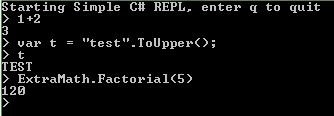
Simple C# REPL with Mono.CSharp

Here is the full code (github) of my simple REPL. If you end a statement with ';' then it will run without returning an output, use this when you want to create objects . If you omit the ';' then the expression is evaluated and the result printed. Note that I added a reference to my program to the evaluator in order to be able to call the Factorial function. Also fon't to forget to run the necesssary Using statements.

// Install-Package Mono.CSharp
using System;
using System.Reflection;
using Mono.CSharp;
namespace SimpleREPL
{
  public class ExtraMath
  {
    public static int Factorial(int n)
    {
      // naive implementation but fast enough for small n
      int result = 1;
      for (int i = 1; i <= n; i++)
      {
        result *= i;
      }
      return result;
    }
  }

  internal class Program
  {
    private static void Main(string[] args)
    {
      Console.WriteLine("Starting Simple C# REPL, enter q to quit");
      var evaluator = new Evaluator(new CompilerContext(
        new CompilerSettings(),
        new ConsoleReportPrinter()));
      evaluator.ReferenceAssembly(Assembly.GetExecutingAssembly());
      evaluator.Run("using System;");
      evaluator.Run("using SimpleREPL;");
      while (true)
      {
        Console.Write("> ");
        var input = Console.ReadLine();
        input = input.TrimStart('>', ' ');
        if (input.ToLower() == "q")
        {
          return;
        }
        try
        {
          if (input.EndsWith(";"))
          {
            evaluator.Run(input);
          }
          else
          {
            var output = evaluator.Evaluate(input);
            Console.WriteLine(output);
          }
        }
        catch
        {
          Console.WriteLine("Error in input");
        }
      }
    }
  }
}

C# REPL

Until recently when you wanted to test small snippets of C# code you had to create a small console application or use the immediate window while debugging or use something like LinqPad.

But a few weeks ago Microsoft finally announced a solution for this called Roslyn. The goal of Roslyn is to provide an API for the compiler. This is still just a CTP but it is very promising. One of the features of Roslyn is an interactive window for C# also called a REPL (read eval print loop). Note that some C# features like Linq query expressions, events and the dynamic and async keywords have not been implemented yet. More information on the Roslyn CTP can be found here Introducing the Roslyn CTP and here http://msdn.com/roslyn.

Tip of the day:
When you want to reevaluate or edit a previous entry then use ALT+Up and ALT+Down.

Bonus tip:
You might also wanna try out Jash. This is a javascript shell that can be opened on any website with a bookmarklet. It features some code completion and is very practical for trying out things you`re unsure about.

Performance of Checked vs Unchecked

If you're ever in doubt on using the checked keyword in C# or the /checked compiler directive because it might hurt your performance then don't worry anymore.

I did some integer additions on my portable in a checked and unchecked context and the performance decrease was only about 3-5% on operations of about 5 seconds. Don't forget that checked and unchecked only have an effect on integers. Float and double never check for overflows and the decimal always does. More info on this feature can be found on msdn and in this Code Project article

This is the code I used to benchmark the performance of a checked vs unchecked context. I also tested subtraction, multiplication and division with similar results. Pay great attention when using the checked context. Only inline operations are checked/unchecked, code in function calls and anonymous functions isn't.

using System;
using System.Diagnostics;

namespace GISSolved.TestConsole
{
    class Program
    {
        static void Main(string[] args)
        {
            GC.Collect(3, GCCollectionMode.Forced);
            var checkedResult = TimeIt(true);
            Console.WriteLine("Checked : {0}", checkedResult);
            GC.Collect(3, GCCollectionMode.Forced);
            var uncheckedResult = TimeIt(false);
            Console.WriteLine("Unchecked : {0}", uncheckedResult);
            Console.WriteLine("Difference : {0:0}%", (1 - ((double)checkedResult / (double)uncheckedResult)) * 100);
            Console.ReadLine();
        }
        
        static long TimeIt(bool isCheckedCalculation)
        {
            var s = new Stopwatch();
            s.Start();

            Int32 a = 123, b = 123;
            if (isCheckedCalculation)
            {
                checked
                {
                    for (int i = 0; i < 900000000; i++)
                    {
                        a = i + b + a;
                        a = 125;
                    }
                    // extra check to make sure that overflow exceptions are thrown
                    try
                    {   
                        Int32 x = a + Int32.MaxValue;
                    }
                    catch (OverflowException)
                    {
                        Console.WriteLine("Int32 Overflow");
                    }
                }
            }
            else 
            {
                unchecked
                {
                    for (int i = 0; i < 900000000; i++)
                    {
                        a = i + b + a;
                        a = 125;
                    }
                    Int32 x = a + Int32.MaxValue;
                }
            }
            s.Stop();
            return s.ElapsedMilliseconds;
        }
    }
}